- Comparisons
Top 5 MCP Server Solutions Compatible with WordPress
Discover the top 5 MCP server WordPress solutions in 2026. Compare features, pricing & setup time to find the best fit for your site.

WebSensePro
Developer
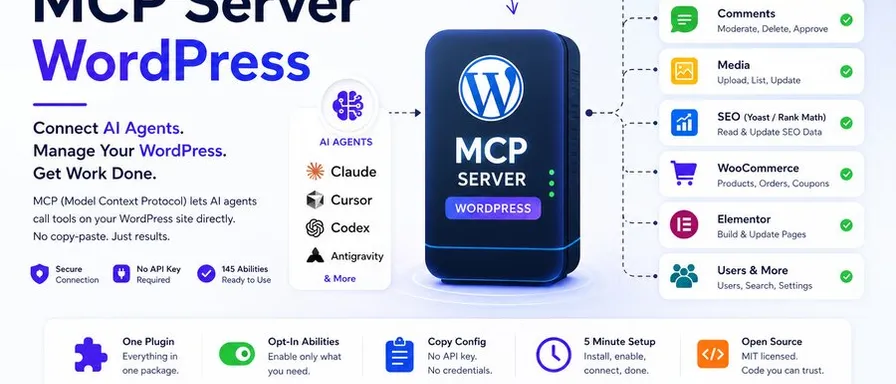
If you’ve been following the AI space at all in 2026, you’ve probably heard the term MCP server thrown around more and more — especially in WordPress circles. And for good reason. The Model Context Protocol (MCP) has quietly become one of the most important shifts in how AI tools interact with the web.
But here’s the thing: not all MCP server WordPress solutions are created equal. Some are rock-solid and ready for production. Others are still early experiments that’ll cost you hours of configuration headaches. Some are free. Others lock key features behind expensive subscriptions.
I’ve spent time digging through the current landscape so you don’t have to. In this post, I’m breaking down the top 5 MCP server solutions compatible with WordPress in 2026 — what they do, who they’re for, and which one might be the right fit for your site.
Let’s get into it.
What Is an MCP Server for WordPress?
Before we dive into the list, a quick primer for anyone who’s new to this.
MCP, short for Model Context Protocol, is an open standard originally introduced by Anthropic that defines how AI clients (like Claude, ChatGPT, or Cursor) communicate with external tools and systems. Think of it as a universal translator between AI assistants and the platforms they interact with.
An MCP server for WordPress bridges that gap for your website. Once set up, your AI assistant can read your posts, update pages, manage media, handle WooCommerce products, edit SEO metadata — all directly from a chat interface, without copy-pasting a single line of content. The AI acts on your actual site, through a secure, permission-controlled connection.
It’s a genuinely big deal for bloggers, developers, and agencies managing WordPress sites at scale.
What to Look for in a WordPress MCP Server
Before committing to any solution, here are the key factors worth evaluating:
- Ease of setup — Can you get from zero to working in under 30 minutes?
- Tool coverage — What WordPress actions does it support out of the box?
- Security model — How does it handle authentication and permissions?
- AI client compatibility — Does it work with Claude, ChatGPT, Cursor, and others?
- Cost — Is there a meaningful free tier, or does real functionality require a paid plan?
With those criteria in mind, here are the top five.
1. Free WordPress MCP — Best Free Option for Self-Hosted Sites
Website: freewordpressmcp.com Price: $0 — MIT licensed, open source Best for: Self-hosted WordPress users who want full AI integration without paying for it
If you’re running a self-hosted WordPress site and want the most capable free MCP server available right now, Free WordPress MCP is the one to install.
The plugin exposes 145 abilities covering posts, pages, media, WooCommerce, Yoast SEO, ACF, and Elementor. Every single one of those abilities is toggleable — you decide exactly what your AI can and can’t touch. There’s no account to create, no API key dance, no external service dependency. It’s a straight plugin install, and you’re up and running.
What really sets Free WordPress MCP apart is its security model. The AI acts as a WordPress user you designate, inheriting that user’s role and permissions. So if you want the AI to only read content and never write, you set up a read-only user and point the connection there. Access can be revoked instantly. Because the plugin is MIT-licensed and fully open source, the code handling your credentials is publicly auditable — no black boxes.
The plugin works with every major MCP-compatible AI client: Claude, ChatGPT, Cursor, Codex, and more. Step-by-step setup videos walk you through connecting each one.
For bloggers, developers, and small agencies seeking genuine AI-powered WordPress management at no cost, this is the clear starting point.
Highlights:
- 145 abilities covering the full WordPress stack
- MIT licensed — no vendor lock-in, no hidden costs
- No account or API key required
- Compatible with Claude, ChatGPT, Cursor, Codex
- Fine-grained, ability-by-ability permission control
2. WordPress MCP Adapter (Official) — Best for Developers
Website: wordpress.org / GitHub (WordPress/mcp-adapter) Price: Free, open source Best for: Plugin developers and technical teams who want deep control
The WordPress MCP Adapter is the official WordPress package for bridging the Abilities API (which shipped in WordPress 6.9) to MCP. This is the tool the WordPress project itself is building, which gives it a certain legitimacy that third-party plugins can’t match.
Unlike Free WordPress MCP’s plug-and-play approach, the MCP Adapter is a developer-first tool. You register abilities with typed schemas and permission callbacks, then expose them through the adapter. What that means in practice is that you get extremely precise control over exactly what the AI can see and do — but you need to write code to get there.
Setup takes 15–30 minutes for developers who are comfortable with WordPress plugin development. For non-developers, this one isn’t the right fit.
Security is handled through OAuth 2.1, JWT, and Application Passwords, with permission checks inheriting WordPress’s own role system on a tool-by-tool basis. It’s currently at v0.5.0 with around 1,400 GitHub stars.
Highlights:
- Official WordPress project — built to last
- Supports OAuth 2.1, JWT, and Application Passwords
- Permission checks inherit WordPress roles natively
- Free and open source
- Scales with your plugin stack automatically
3. WPVibe — Best for Ease of Use
Website: wordpress.org/plugins/vibe-ai Price: Free plan available; paid plans for higher usage Best for: Non-technical users who want the quickest path to AI-powered WordPress
If “setup in minutes” is your primary requirement, WPVibe is worth a serious look. It’s a complete MCP server implementation that packages WordPress content management, media uploads, theme file browsing, REST API access, and plugin abilities as MCP tools your AI can call — all behind a streamlined interface that doesn’t ask much of you technically.
You install the free WordPress plugin, connect your site once, and your MCP-compatible AI client becomes a WordPress co-pilot. WPVibe handles authentication and encrypts credentials with AES-256-GCM, so security isn’t an afterthought.
The free plan includes every tool and skill, with a daily allowance of WordPress actions that is enough to evaluate the product thoroughly and handle moderate usage. WPVibe works with the free plans of Claude and ChatGPT.
The trade-off compared to Free WordPress MCP is that WPVibe relies on an external service rather than running entirely on your own server, which some users will be comfortable with and others won’t.
Highlights:
- Extremely easy setup — one plugin, one connection
- AES-256-GCM credential encryption
- Free plan covers all tools with daily limits
- Works with Claude and ChatGPT free plans
- Good for bloggers and content creators
4. IATO MCP — Best for SEO-Focused Workflows
Website: iato.ai/wordpress-mcp Price: Free plugin; IATO bridge tools require an API key Best for: Content teams and SEO professionals who want AI to manage on-page optimization
IATO MCP takes a notably different angle from the other solutions on this list. While most WordPress MCP servers focus broadly on content and site management, IATO has a strong SEO and audit workflow focus built right in.
The plugin ships with 40 native WordPress tools that work immediately after activation, covering posts, pages, Elementor editing with optimistic concurrency, idempotency, and bulk operations. Crucially, it automatically detects whichever SEO plugin you’re running (Yoast, RankMath, or SEOPress) and writes to the correct meta keys without any configuration. The AI just knows what to do.
Every write tool returns a change_receipt with a unique ID, before/after values, and a timestamp. Claude can call a rollback endpoint using that ID to undo any AI-made change — a genuine safety net for teams who are nervous about giving AI write access to a live site.
The 12 IATO bridge tools (for crawl data and audit functions) require an IATO API key, which adds a cost to that functionality.
Highlights:
- Auto-detects and writes to Yoast, RankMath, and SEOPress correctly
- Full rollback capability on every AI write action
- Elementor editing with concurrency and idempotency controls
- 40 native tools work immediately — no configuration needed
- Strong fit for SEO professionals and content agencies
5. InstaWP — Best for Managed WordPress Users
Website: instawp.com Price: Included with InstaWP managed WordPress plans Best for: Agencies and developers on managed WordPress who want MCP with zero infrastructure setup
InstaWP approaches the MCP server WordPress problem from a completely different direction: instead of adding MCP to an existing WordPress install, it builds MCP directly into its managed WordPress platform.
While every other solution on this list requires a Node.js installation, npm packages, or configuration files, InstaWP delivers one-click MCP activation from your site dashboard. For agencies running multiple client sites on managed infrastructure, this is a genuinely compelling proposition — especially if they’re already InstaWP customers.
The trade-off is obvious: if you’re not on InstaWP’s managed platform, this option isn’t available to you. And for self-hosted WordPress users — which accounts for roughly 43% of all WordPress installations — you’ll need one of the other solutions on this list.
Highlights:
- Built directly into InstaWP’s managed WordPress platform
- One-click activation — no Node.js or configuration files
- Eliminates infrastructure complexity for agencies
- Ideal for teams already using InstaWP
- Not available for self-hosted WordPress
Solution Comparison Table
| Solution | Price | Best For | Self-Hosted? | Setup Time |
|---|---|---|---|---|
| Free WordPress MCP (Recommended) | Free (MIT) | Everyone — self-hosted | Yes | ~10 min |
| WordPress MCP Adapter | Free | Developers | Yes | 15–30 min |
| WPVibe | Free / Paid | Non-technical users | Yes | ~5 min |
| IATO MCP | Free + API key | SEO & content teams | Yes | ~15 min |
| InstaWP | Managed plan | Agencies on InstaWP | No | ~1 min |
Which MCP Server WordPress Solution Should You Choose?
Here’s the honest, simplified answer:
If you’re running a self-hosted WordPress site and want the most capable free option with no strings attached — start with Free WordPress MCP. It covers 145 abilities, costs nothing, requires no external account, and is fully open source. For most bloggers, developers, and small agencies, it covers everything you’ll need.
If you’re a plugin developer who wants maximum control over what the AI can see and do, the official WordPress MCP Adapter is worth the setup investment.
If you want the fastest possible setup and don’t mind an external service handling the connection, WPVibe will get you from zero to AI-connected in under five minutes.
If SEO and content workflows are your primary use case, IATO MCP’s auto-detection of SEO plugins and built-in rollback capability makes it a standout choice for content teams.
If you’re already on InstaWP’s managed platform, the built-in MCP support is the obvious choice — it removes every infrastructure headache from the equation.
Final Thoughts
The MCP server WordPress ecosystem has matured remarkably fast in 2026. A year ago, this category barely existed. Today, there are genuinely excellent free and open-source options that any WordPress site owner, technical or not, can get running in minutes.
If you’re sitting on the fence about whether AI-powered WordPress management is worth exploring, the answer is: start with a free option, test it on a staging site first, and see what it unlocks for your workflow. The potential upside — AI that can directly read and edit your site through a permission-controlled connection — is real and substantial.
Ready to get started? Visit Free WordPress MCP to download the plugin, watch the setup videos, and connect your first AI client to WordPress — at no cost, with no vendor lock-in.
Have you tried any of these WordPress MCP server solutions? Drop your experience in the comments — I’d love to hear what’s working for you.
Ready to Connect Your AI Agent to WordPress?
Free forever. No account, no API key, no usage limits.
Download the plugin and be connected in about three minutes.